We have built reports you can use to invite your patients in for their childhood immunisations. The reports are in Welby Innovate Prescribing - 8 Childhood Imms
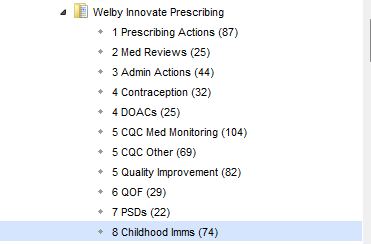
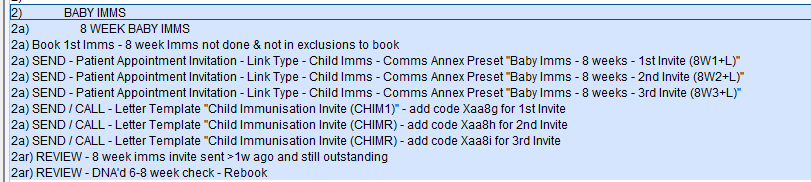
The reports are then separated into the different age groups (E.g., 8 week Imms) You then have the option to send 1st, 2nd and 3rd invites by appointment links, or call/send a letter to those who cant receive a link.
For further information on setting up appointment links, see our support article here -How do I set up appointment invitations? : Welby Innovate
If you do not wish to use appointment links for childhood immunisations, you can send a generic SMS message, letter or call the patient and add the 1st, 2nd or 3rd invite code stated on the letter reports for each relevant immunisation age group.
Note the example below is for the 8 week Immunisations, each age group will have different codes stated on the letter reports in their relevant section

If they were then not to book or DNA'd the appointment, they will appear in the "REVIEW" reports to find patients who have been invited and are still outstanding.
Once patients have been invited, the green A booking prompt will then direct staff to book the appointment as shown below
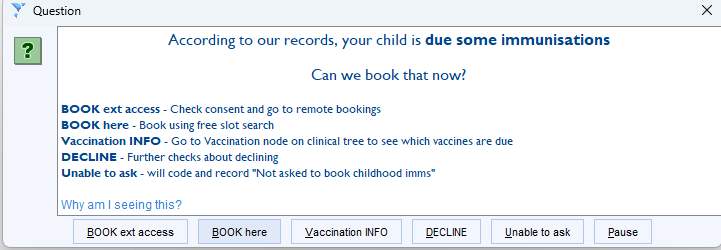
It will direct staff to use the Free Slot Search "Child Imms"
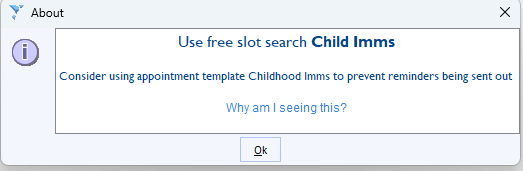
For more information on Free Slot Searches see our support article here - How do I configure free slot searches? : Welby Innovate
Was this article helpful?
That’s Great!
Thank you for your feedback
Sorry! We couldn't be helpful
Thank you for your feedback
Feedback sent
We appreciate your effort and will try to fix the article