This video explains how our Proactive Prescribing Checks protocol can be used to support the safe prescribing of medication. Typically, staff can issue medication if it is on repeat and hasn't reached its review date, maximum issues and isn't being requested too early. This may not always be safe to issue though, and our protocol will run checks before they are issued, to proactively ensure it is still safe to do so.
The system will check on the below various things to decide if medication is safe to prescribe, these all are linked to the other parts of our system that work together:
- If the patient is on any high risk drugs that are overdue monitoring - How do I check Medication Monitoring when issuing high-risk drugs?
- Medication compliance
- If the patients review dates are overdue or reached maximum issues and how to proceed (will go through our overdue repeats pathway) - Prescribing Instructions: Overdue Repeats Pathway
- If patients appear in any of the below High priority prescribing alerts:
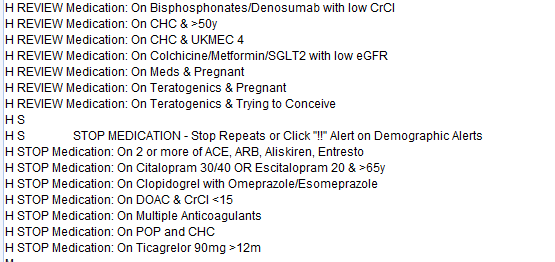
1. Launch the Proactive Checks
- If a patient has some proactive checks that should be ran, they will have the following icon on their patient demographics:

- To run the checks, simply click this icon. This is the safest way of using these checks, there is an option for the checks to launch after medication is issued, and the system may advise to undo the issues. However, there is a possibility of staff forgetting to undo the issues, so running the checks prior to medication being issued is the safest way.
2. Handle the warnings
- Each warning will have different options to follow depending on the checks. Staff follow the warnings and choose the most appropriate actions.
- In this example below the patient has monitoring that is overdue.
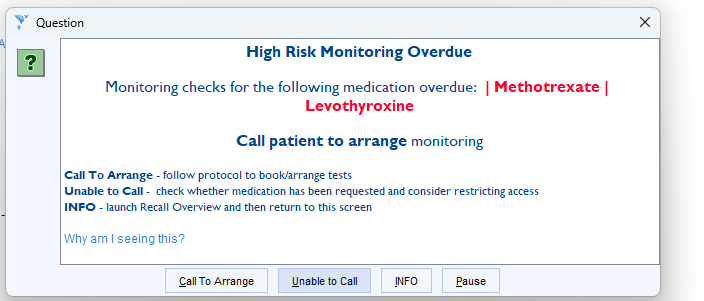
- Each warning will have it's own options to choose from to process the warning. All our of warnings will also explain which each option will do if chosen. Each warning can then be actioned accordingly. It is important staff carefully read the information and do not pause or skip these warnings.
- Whichever option is chosen, the system will always document in the journal what has been checked, what has been advised as well as the action taken for a clear audit trail. For example:

Was this article helpful?
That’s Great!
Thank you for your feedback
Sorry! We couldn't be helpful
Thank you for your feedback
Feedback sent
We appreciate your effort and will try to fix the article