Before your Kick Off Meeting, we will ask you to grant your Project Team at Welby Innovate access to your SystmOne. Here, we provide a brief explanation of why we ask for this.
Why do we need access to your SystmOne?
It’s not essential, but it can be a big help in supporting your practice, particularly during the onboarding process. All of this can be done by you instead, with sufficient screenshots, running reports or reviewing patients with us via Teams, but most practices find it easier to give a couple of us access, at least during the onboarding phase.
These are the things we use access for:
Running clinical reports to gather data to support your onboarding and decision-making, e.g. finding out how many patients you have with a particular condition or medication and the impact of opting in or out of including those patients.
Running clinical reports to carry out system checks, e.g. to make sure there are no local issues with the way your lab codes certain results, and that these are factored into the setup.
Checking that the way we’ve configured your system works in practice and reflects the way you want to work as a practice, e.g. booking appointments for annual reviews and testing on individual patients.
Developing and testing new pathology rules to file results for you.
Investigating any issues you may come across with specific patients.
What assurances can you provide?
All access is through appropriate hardware with smart card access to SystmOne.
All of us have undergone relevant IG training and have a background in primary care ourselves.
As an organisation, we complete DSPT every year and are Cyber Essentials certified.
No patient data is extracted from your system or saved elsewhere.
What level of access do you need?
At a minimum, the rights to run clinical reports and retrieve patient records.
To develop pathology auto-review rules, we need the Pathology User access right.
If you want us to assist in setting up local protocols that may be needed, we also require Template Manager access rights.
We would recommend giving us access for a restricted time, e.g. six months, to support onboarding and initial rollout. We’re happy to sign any confidentiality agreements you may have in place at your practice.
If you have concerns about any of this, it is not essential for us to have access. We will simply need a bit more of your time to investigate issues, run clinical reports and support you in completing these checks.
Setting us up
If you do add us on, it would be an enormous help if you could assign us our toolbar. To do that...
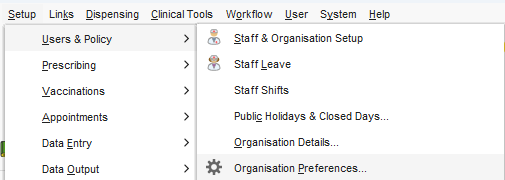
1) Go to organisation preferences:
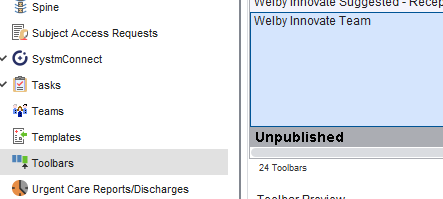
2) Go to toolbars and find ours (probably at the bottom of your list):
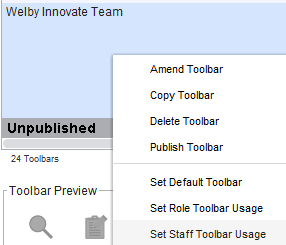
3) Right click and select "Set Staff Toolbar Usage"
4) All your staff will be in the "Not Selected" section. Find us in the list, double click on our names to move us into "Selected", then press "Ok".
Thank you!!!
Was this article helpful?
That’s Great!
Thank you for your feedback
Sorry! We couldn't be helpful
Thank you for your feedback
Feedback sent
We appreciate your effort and will try to fix the article