Over many years, we've developed a tool for extracting data from SystmOne and providing more useful metrics for practices. Our spreadsheet also tells you how different parts of our system can help you maximise your QOF income.
Use the link at the bottom of this page to download the spreadsheet.
You'll need to allow the macros to run, so before you open the spreadsheet...
- Go to your Downloads folder
- Right click the file and select Properties
- At the bottom of the General tab, tick the box Unblock, then Apply, then OK. If you've already opened the document, this option may not be available - start again with a new download
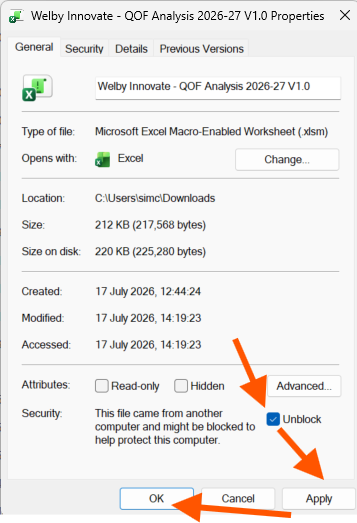
- You can now open the spreadsheet then save it somewhere you can use it in the desktop version of Excel (it won't work in the online version)
- Go to the Analysis tab and enter your practice name in cell B2
- Enter your list size in cell B3
- Go to the Instructions tab and follow the step by step for importing your practice QOF data
We've provided indicative £ values for indicators. These are based on the following for 26/27:
- QOF pounds per point: £227.95
- National average list size: 10,295 (the basis for Contractor Population Index calculation)
- National prevalence data: 2025 QOF audit (where available at time of publishing). This will be updated to reflect 2026 data once this becomes available.
If you're interested in watching our webinars, here's where you'll find our previous QOF ones:
Was this article helpful?
That’s Great!
Thank you for your feedback
Sorry! We couldn't be helpful
Thank you for your feedback
Feedback sent
We appreciate your effort and will try to fix the article