Once you are using the Pathology Module and have switched on auto-review rules, each rule will be applied to all patients meeting the criteria for that rule.
However you may want to block this for an individual patient, so that pathology results are left for a clinician to review individually.
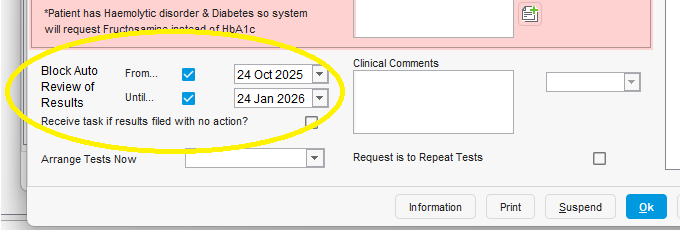
You can do this from the Bloods tab of the Request One-Off Tests template.
There are two check-boxes at the bottom of the template to specify when you want to block auto-review from and until, as in the screenshot below.
Was this article helpful?
That’s Great!
Thank you for your feedback
Sorry! We couldn't be helpful
Thank you for your feedback
Feedback sent
We appreciate your effort and will try to fix the article